
Visual day planner
A to-do list shows what. A 24-hour circle shows when.
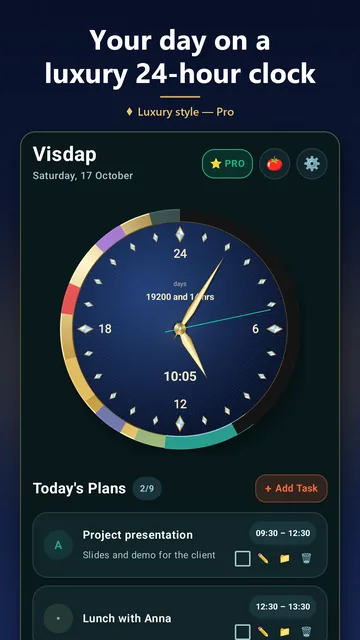
A list tells you what to do but hides the clock. Visdap draws your whole day as colored sectors around a 24-hour dial, so you see how long each task takes, where the free gaps are and how much of today is left.



- No account
- No ads or tracking
- Works offline
List or circle: what changes
Time takes up space
In a list, a ten-minute call and a three-hour block look the same. On the circle, the longer the task, the longer its arc.
Free gaps are visible
Stretches of the ring with no sector are time nothing is planned for yet. You see them before you overload the day.
You see “now”
The hand points at the current moment, and the part of the day that has passed can be shaded, so what's left is obvious at a glance.
All 24 hours, sleep included
Morning, work, evening and sleep on one dial, with no AM/PM mix-ups. On Android, the same day shows in the app, in the widget and on the watch. The Windows app keeps its own plan.
Questions and answers
Is Visdap a to-do list?
It's a day planner. Each task gets a time, a color and, if you like, a reminder and a checklist. Instead of a long list, tasks become sectors on a 24-hour dial.
Do I have to plan every minute?
No. Add only what matters; the rest of the ring stays free time. The free version allows 2 tasks a day, and Pro removes the limit.
Which devices does it work on?
Android phones, Wear OS watches and Windows PCs. iPhone and Mac versions are on the way.
Plan today. See all of it.
Install Visdap and plan your first day in a couple of minutes. Free to start.